Documentation for the Grails 7+ Shiro plugin, Shiro 3.0.0
1. Concept and Aim
We’re trying to make security as simple and flexible as possible. Using the ideas of having a relatively opinionated and convention driven project we’ll spell out the conventions (defaults) as much as possible.
The aim here is to make this security framework understandable, because you don’t have security if you don’t understand what is happening under the hood.
Another aim is to make this grails part well tested, so you can trust that it is doing what we say it is doing.
2. Changes
2.1. Plugin v6.0.0 Shiro 3.0.0
-
Upgrade to Grails 7
-
Upgrade to Shiro 3.0.0
Shiro 3 has stricter or safer defaults than previous versions. Grails applications may need to set additional configuration properties for Interceptors and Annotations to work as before:
security:
  shiro:
    filter:
      # We configure shiro to allow anonymous/public access by default. That way we can fully control access using Grails interceptors, annotations etc.
      allowAccessByDefault: true
Adding the plugin to your Grails application should be as simple as
dependencies {
    implementation project('org.grails.plugins:grails-shiro:6.0.0')
}
2.2. Plugin v5.0.0 Shiro 2.0.1
-
Upgrade to Grails 5
-
Upgrade to Shiro 2.0.1
Note you now need to include apache shiro in your build.gradle due to the newer versions of Gradle not pulling in transitive deps. Quick Fix:
dependencies {
 ...
// add this to dependencies to get shiro depenedencies
    ['ehcache', 'core', 'spring', 'web'].each { pkg ->
        implementation("org.apache.shiro:shiro-$pkg:$shiroVersion") {
            exclude module: 'ejb'
            exclude module: 'jsf-api'
            exclude module: 'servlet-api'
            exclude module: 'jsp-api'
            exclude module: 'jstl'
            exclude module: 'jms'
            exclude module: 'connector-api'
            exclude module: 'ehcache-core'
            exclude module: 'slf4j-api'
            exclude module: 'commons-logging'
        }
    }
}
2.3. Plugin v4.5.9 Shiro 1.13.0
-
Upgrade to shiro 1.13.0
2.4. Plugin v4.5.8 Shiro 1.8.0
-
Upgrade to shiro 1.8.0
-
fix Geb/selenium tests
-
This is an interim fix release for Grails 4 before fixing plugin publishing
2.5. Plugin v4.4 & v3.4 Shiro 1.7.1
-
Upgrade to shiro 1.7.1
2.6. Plugin v4.3 & v3.3 Shiro 1.5.3
-
Fixed Unauthorized redirect missing context path - https://github.com/nerdErg/grails-shiro/issues/16
-
Upgrade to shiro 1.5.3
2.6.1. Breaking change
With the fix for the Unauthorized redirect issue we took the opportunity to replace the mechanism that uses the URL mapping to determine where to redirect AuthorizationException and UnauthenticatedException. Now we use the same settings login and unauthorized as used for accesscontrol().
This does mean if you had a different setting for Annotation controlled access to Interceptor controlled access that this will break.
2.7. From grails-shiro plugin for grails 2.x
-
Your realm has the GrailsShiroRealm trait injected
-
Your realm must now implement authenticate as
AuthenticationInfo authenticate(AuthenticationToken authenticationToken) throws AuthenticationExceptionpreviously you could just return a Collection of things or just a thing. -
The default realms implement SimplifiedRealm which is the minimum you need to implement
-
Settings - loginUrl, successUrl, unauthorizedUrl… the settings were rather inconsistent so a lot has changed here so check the settings section below.
-
You don’t need to specify annotationdriven any more, they are there by default (Shiro annotations)
-
Deprecated grails shiro annotations have been removed. (@RoleRequired, @PermissionRequired)
-
The old static accessControl property on the controller has been removed in favour of Annotations and Interceptor. (I believe the static accessControl property was broken anyway.) This also remove the confusing differences between the different accessControl DSLs
-
Removed Typed Permission object in hasPermissions tag (just pass a Permission object as the permission in place of a string)
-
FilterAccessControlBuilder now gives NPE e.g.
argument 'auth' is class java.lang.String but should be class java.lang.Boolean.inplace of IllegalArgumentException for missing arguments. -
FilterAccessControlBuilder now gives an IllegalArgumentException if an invalid argument is supplied
-
we’ve removed the ShiroBasicPermission and the 'simple' DbRealm.
3. Getting started
If you’re implementing your security from scratch, then you can simply install grails-shiro by adding the grails-shiro dependency to your build.gradle dependencies and typing
'grails shiro-quick-start'.
This will create a ShiroWildcardDbRealm in your grails-app/realms directory and make a ShiroUser and ShiroRole domain
class. It will also create an AuthController to let you log in. Check out Wildcard DB Realm for how you might populate
a couple of users using Boostrap.groovy.
Now to Control access to a Controller add an Interceptor for that controller using
grails create-shiro-controller-interceptor MyController which will add
access control by convention.
If you’re new to web security a couple of terms you may need to know:
-
Realm: A Realm is like a bouncer for your app. It determines if someone is allowed in and has the permissions to do something. Realms know where the guest list is and can check your credentials against it.
-
Principal: in most cases as far as we’re concerned it’s a key to a user. This could be anything, as Simple as a String, or a user object (not normally the User domain object, because a principal may not be a User).
4. Scripts - Quick start
-
grails shiro-quick-start
-
grails create-auth-controller
-
grails create-wildcard-realm
-
grails create-ldap-realm
4.1. shiro quick start
grails shiro-quick-start is designed to get you up and running with shiro quickly. It basically runs create-wildcard-realm
and create-auth-controller for you. You can control what the realm is called and where it goes like this:
| command | package | Realm Name | User Name | Role Name | Controller Name | Interceptor Name |
|---|---|---|---|---|---|---|
|
|
|
|
|
|
|
|
|
|
|
|
|
|
|
|
|
|
|
|
|
|
|
|
|
|
|
|
4.2. create auth controller
grails create-auth-controller creates a base controllers/../AuthController.groovy controller and an controllers/../AuthInterceptor.groovy
Interceptor for logging you in and out. The Interceptor makes sure you can access the AuthController actions.
You can change the package and name of the controller like this:
| command | package | Controller Name | Interceptor Name |
|---|---|---|---|
|
|
|
|
|
|
|
|
|
|
|
|
4.3. create wildcard realm
grails create-wildcard-realm creates a wildcard realm. See Create a Wildcard Realm.
4.4. create ldap realm
grails create-ldap-realm creates an LDAP realm. See Creating an LDAP realm.
4.5. create shiro controller interceptor
grails create-shiro-controller-interceptor creates a new controllers/../[insert controller name here]Interceptor.groovy with a
default accessControl() for that controller only. You can of course edit the Interceptor to make it catch more
controllers if you wish. See Interceptor.
5. Settings
Using the defaults and shiro quick start you don’t need any settings, however when you want to change things up to suit your project you’re going to need some.
Settings should be in your configuration (application.yml or application.groovy etc.) anchored at: security.shiro
5.1. security.shiro
security:
    shiro:
        rememberMe:
            cipherKey: 'abcdedfhijklmnopqrstuvwx'
            keySize: 256
        authc:
            required: false
        session:
            mode: native
        handleExceptions: true
        bycrypt:
            rounds: 10
        login:
            controller: auth
            action: login
        unauthorized:
            controller: auth
            action: unauthorized
        filter:
            basic:
                enabled: false
                appName: Shiro Plugin Test
            loginUrl: /login
            successUrl: /
            unauthorizedUrl: /unauthorized
            filterChainDefinitions: |
                                    /basic/** = authcBasic
                                    /form/** = authc
        realm:
            ldap:
                server:
                    urls: ldap://localhost:10389
                search:
                    base: ou=users,dc=example,dc=com
                    user: uid=admin,ou=system
                    pass: secret
                    group:
                        name: ou=groups,dc=example,dc=com
                        member:
                            element: uniqueMember
                            prefix: uid=
                    permission:
                        commonName: cn=permissions
                        member:
                            element: uniqueMember
                            prefix: uid=
                username:
                    attribute: uid
5.1.1. rememberMe cipherKey
| since version 3.1 |
Options: 16, 24 or 32 char string. Default: a random 256 bit key generated on each boot
You can set the cipherKey used for encrypting the rememberMe cookie. It needs to be an ASCII string 16,24, or 32 characters (bytes) long. It is probably best for security not to set this value, but let the system generate a new random key each time the application starts.
You may want to set the key though so that users don’t have to sign in again when the application restarts, or if you have a multi server/load balanced application or docker swarm.
5.1.2. rememberMe keySize
| since version 3.1 |
Options: 124, 192, 256. Default: 256
This specifies the size of the randomly generated rememberMe key. If you set the cipherKey, this setting is ignored.
5.1.3. authc required
Options: true or false. Default: true.
Is authentication required by default when using Interceptors and the accessControl() function.
5.1.4. session mode
Options: 'native'. Default: '' (servlet container session).
Session mode can be set to 'native' which uses the shiro native session manager "with sensible defaults".
If not set you get the servlet containers (Tomcat) session manager.
5.1.5. handleExceptions
Options: true/false. Default: true.
If false we don’t replace the GrailsExceptionResolver with ShiroGrailsExceptionResolver which redirects Unauthenticated and Unauthorized exceptions to 401 and 403 handlers as defined in UrlMappings. You may want to turn this off if you have another way of doing it or wish to replace Exception Resolution with your own.
5.1.6. bycrypt rounds
Options: n ⇐ 30. Default: 10.
Sets the log rounds for the default BCrypt password encryption.
5.1.7. login redirect
used by the default accessControl() Method and realms to redirect users to a login page.
-
controller - default 'auth'
-
action - default 'login'
-
uri - default /auth/login (trumps controller/action)
5.1.8. unauthorized redirect
used by the default accessControl() Method and realms to redirect users to say unauthorized (Sorry Dave…)
-
controller - default 'auth'
-
action - default 'unauthorized'
-
uri - default /auth/unauthorized (trumps controller/action)
5.1.9. filter
configuration for shiros filters via ShiroFilterFactoryBean
filterChainDefinitions
see ShiroFilterFactoryBean and Chain Definition Format In a conventional grails app you probably only ever want a Basic HTTP Authentication filter. Normally you just want to use the Interceptors and authController.
loginUrl
where to redirect users to a login page when using a shiro filter like Basic HTTP Authentication filter See setLoginUril() Defaults to security.shiro.login.url
unauthorizedUrl
where to redirect users when they are no authorized when using a shiro filter like Basic HTTP Authentication filter See setUnauthorizedUril() Defaults to security.shiro.unauthorized.url
successUrl
where to redirect users when they successfully log in when using a shiro filter like Basic HTTP Authentication filter See setSuccessUril() Defaults to null
basic
-
enabled - true/false - add a Basic HTTP Authentication filter
-
appName - sets the application name on the BasicHttpAuthenticationFilter this defaults to the config setting of info.app.name
6. Annotations
The Grails Shiro plugin supports the Shiro Annotations:
Annotations can be on a class or method. Annotations on methods take precedence.
Annotations will throw an UnauthenticatedException or AuthorizationException which should be caught by the ShiroGrailsExceptionResolver
and redirected. See Redirecting Unauthenticated and Unauthorized.
package com.nerderg

import org.apache.shiro.authz.AuthorizationException
import org.apache.shiro.authz.UnauthenticatedException
import org.apache.shiro.authz.annotation.Logical
import org.apache.shiro.authz.annotation.RequiresAuthentication
import org.apache.shiro.authz.annotation.RequiresPermissions
import org.apache.shiro.authz.annotation.RequiresRoles

@RequiresAuthentication
@RequiresRoles(value=["User", "test"], logical=Logical.OR)
class AnnotatedController {

    def index() {
        redirect(action: "list", params: params)
    }

    @RequiresPermissions('book:list')
    def list(Integer max) {
        render("list")
    }

    @RequiresPermissions('book:create')
    def create() {
        render("create")
    }

    @RequiresPermissions('book:save')
    def save() {
        render("save")
    }

    @RequiresPermissions('book:view')
    def show(Long id) {
        render("show")
    }

    @RequiresPermissions('book:edit')
    def edit(Long id) {
        render("edit")
    }

    @RequiresPermissions('book:update')
    def update(Long id, Long version) {
        render("update")
    }

    @RequiresPermissions('book:delete')
    def delete(Long id) {
        render("delete")
    }
}package com.nerderg
import org.apache.shiro.authz.annotation.RequiresAuthentication
import org.apache.shiro.authz.annotation.RequiresGuest
import org.apache.shiro.authz.annotation.RequiresPermissions
import org.apache.shiro.authz.annotation.RequiresRoles
import org.apache.shiro.authz.annotation.RequiresUser
class SecuredMethodsService {
def methodOne() {
return 'one'
}
@RequiresGuest
def methodTwo() {
return 'two'
}
@RequiresUser
def methodThree() {
return 'three'
}
@RequiresAuthentication
def methodFour() {
return 'four'
}
@RequiresRoles('User')
def methodFive() {
return 'five'
}
@RequiresPermissions("book:view")
def methodSix() {
return 'six'
}
}7. Interceptor
We use grails Interceptors to intercept calls to a controller and action and determine access using accesControl().
| This is separate from Annotations which directly implement controls on methods/actions in controllers and services. |
By convention you need an interceptor for the auth controller to allow people to log in, e.g.
class AuthInterceptor {

  boolean before() { true }
  boolean after() { true }

}
When you use the script grails create-auth-controller it will create an AuthInterceptor.groovy as well.
7.1. Interceptor.accessControl() - Method in Interceptor
accessControl(boolean authcRequired, Map [args], Closure [returning boolean to determine permission])
In an interceptor you can use the dynamic accessControl() method to authenticate a user for a given URL. e.g.
class BookInterceptor {

    //customize me
    int order = HIGHEST_PRECEDENCE - 2

    boolean after() {
          true
    }

    boolean before() {
        accessControl {
            role("Administrator")
        }
    }
}
accessControl() returns a boolean which is used to determine if an action is executed (see https://docs.grails.org/3.3.10/guide/single.html#interceptors).
If authentication is required and the user hasn’t logged in this session, then accessControl() will by default redirect to the auth controllers login action or the uri defined in the login config option.
If the user is remembered, or has logged in, the subjects (users) permissions are checked either using the supplied closure or by checking the convention based permission string if the closure is not supplied.
If you provide a closure you can use the role and permission methods to determine if the user is authorized or you can
just use your own logic. The simplest closure would be accessControl { true } to allow everyone (but you may as well
not use accessControl())
7.1.1. Permission String conventions
By convention the permission to access a controller action is controllerName:action e.g. book:edit. So if a user is
attempting to access the edit action of the BookController and they have the permission string 'book:edit' or 'book:*'
then they will be authorized to access the book edit action by default. This is all controlled by the realm.
Note the Wildcard in book:* is what makes the wildcard permissions special. See https://shiro.apache.org/permissions.html
|
We match permissions by convention like:
| example (user has permission) | what it means |
|---|---|
book:show:* |
the user can access the show action with any ID |
book:show,list |
the user can access list and show actions on the book controller |
| if you supply a closure to accessControl() then control by convention is overridden, your closure determines access. (see below) |
7.1.2. Authorization closure
If you do supply a Authorization Closure to accessControl() it overrides the default accessControl conventions.
It provides a number of default (delegated) methods:
-
role(String roleName)e.g. role("Administrator") -
permission(Permission permission)see org.apache.shiro.authz.Permission -
permission(String permissionString)e.g. permission("book:*:view,create,save") -
permission(Map args)e.g. permission(target: 'book', actions: [ 'show', 'modify' ])
if you use multiple permission() or role() calls in an Authorization closure remember you need to provide the logic and return a simple true or false result. True = continue, false = don’t continue. For example:
 class BookInterceptor {

     //customize me
     int order = HIGHEST_PRECEDENCE + 100

     boolean before() {
         // Access control by convention.
         accessControl() {
           role('Administrator') ||
             (role('User') &&
               (
                 permission(target: 'book:read', actions: 'index, list, show') ||
                   permission(target: 'book:write', actions: 'create, edit, delete, save, update')
               )
             )
         }
     }

     void afterView() {
     }
 }
Permissions with actions: return false if the action called isn’t in the actions: list
You can combine the Interceptor accessControl() {} with Annotations. If you do that the user needs to pass both the
annotation check and the accessControl check.
permission(String permissionString)
Checks whether the user has the given 'permission'. The 'permission' is a string formatted as a Shiro WildcardPermission i.e. parts separated by a colon and sub-parts separated by commas.
For example, you might have "book:view,create,save:*", where the first part is a type of resource (a "book"), the second part is a list of actions, and the last part is the ID of the resource ("*" means "all").
The string can contain any number of parts and sub-parts because it is not interpreted by the framework at all. The parts and sub-parts only mean something to the application. The only time the framework effectively "interprets" the strings is when it checks whether one permission implies the other, but this only relies on the logic of parts and sub-parts, not their semantic meaning in the application. See the documentation for Shiro’s WildcardPermission for more information.
|
permission strings treat spaces as significant. So if you have a permission like: book:edit, update:1 your permission won’t match the the 'update' action as it’s going to try and match ' update' |
permission(Map args)
When using the Map variant it’s interpreted as a permission applied to actions. This means that the action names themselves are not really expected to be part of the permission, giving you scope to separate the permissions from the actions.
For example permission(target: 'book:alter', actions: 'create, edit, delete') would mean you only need the 'book:alter'
permission when you try to access create, edit or delete actions (assuming you’re in the BookInterceptor).
7.1.3. Interceptor onNotAuthenticated() and onUnauthorized()
If the Interceptor has a method called onNotAuthenticated(Subject subject, interceptor) it will be called if a user
is not Authenticated. onNotAuthenticated should return true if you want to do the default, which is to redirect to
either auth/login or to a uri defined by the config option grails.plugin.shirosecurity.redirect.uri
If the interceptor has an onUnauthorized(Subject subject, interceptor) method it will be called if the user is not
permitted to do an action either because they don’t have the permission string or the permission closure says "no".
8. Realms
A Realm is like a bouncer for your app. It determines if someone is allowed in and has the permissions to do something. Realms know where the guest list is and can check your credentials against it.
| If you like the bouncer analogy, you can think of logging in as checking in at a conference and the lanyard as the session! Security will check your lanyard when you come and go from the conference :-) |
To make a realm you can start by running one of the realm create scripts:
grails create-wildcard-realm
Basically to be picked up as a Realm it should be in the grails-app/realms directory at some package path and have a name that ends in "Realm" e.g. "grails-app/realms/com/nerderg/security/MyFabRealm"
Your realm automatically implements the GrailsShiroRealm trait and you must override the authenticate method.
The authenticate method returns AuthenticationInfo and takes an AuthenticationToken i.e.
AuthenticationInfo authenticate(AuthenticationToken authenticationToken) throws AuthenticationException
Your realm should at least implement the SimplifiedRealm Interface.
If you override hasAllRoles(PrincipalCollection principalCollection, Collection<String> roles)
the SimplifiedRealm hasAllRoles(Object principal, Collection<String> roles) will not get called unless you do it.
|
The isPermitted(Object principal, Permission requiredPermission) method in the realm needs to choose a
Permission to compare against the requiredPermission, e.g. in WildCardRealm it uses the WildcardPermission.
The GrailsShiroRealm trait expects you to set the the tokenClass used and you can also set the PermissionResolver
to use. The PermissionResolver creates and appropriate Permission object from a string permission, which can be used by
isPermitted() to compare permissions, e.g. getPermissionResolver().resolvePermission(permString).implies(requiredPermission)
    ShiroWildcardDbRealm() {
        setTokenClass(UsernamePasswordToken)
        setPermissionResolver(new WildcardPermissionResolver())
    }
GrailsShiroRealm uses the PermissionResolver to create permissions from vararg methods implemented in a Realm,
e.g. isPermittedAll(PrincipalCollection principal, String… strings) so it’s important to set a PermissionResolver.
|
8.1. Multiple Realms
You can have as many Realms as you like, preferably not for the same principal store. For example you can have a database backed Realm, an LDAP Realm, and a JWT Realm.
8.2. Wildcard DB Realm
We provide a default Wildcard Database Realm that has Users and Roles defined in a database. It creates a User and Role domain class, each has a list of permission strings. The DDL looks something like this:
...
create table shiro_role
(
    id      bigint generated by default as identity,
    version bigint       not null,
    name    varchar(255) not null,
    primary key (id)
);
create table shiro_role_permissions
(
    shiro_role_id      bigint not null,
    permissions_string varchar(255)
);
create table shiro_user
(
    id            bigint generated by default as identity,
    version       bigint       not null,
    password_hash varchar(255) not null,
    username      varchar(255) not null,
    primary key (id)
);
create table shiro_user_permissions
(
    shiro_user_id      bigint not null,
    permissions_string varchar(255)
);
create table shiro_user_roles
(
    shiro_user_id bigint not null,
    shiro_role_id bigint not null,
    primary key (shiro_user_id, shiro_role_id)
);
alter table shiro_role
    add constraint UK_lw6fmfwdi0t4yj2lhitnqwg7b unique (name);
alter table shiro_user
    add constraint UK_36q32iu69w58sanmqioxbf2g1 unique (username);
alter table shiro_role_permissions
    add constraint FK61ryfys5gb5404ddi4daoh0u4 foreign key (shiro_role_id) references shiro_role;
alter table shiro_user_permissions
    add constraint FK7pcseg2cff0ap8j438va1h3kq foreign key (shiro_user_id) references shiro_user;
alter table shiro_user_roles
    add constraint FKhgfeccfx4974oqrtj9krqmx7d foreign key (shiro_role_id) references shiro_role;
alter table shiro_user_roles
    add constraint FK24x73ttu3pwsq9f3pr0qcptn9 foreign key (shiro_user_id) references shiro_user;
You can populate your users like this from our tests:
    PasswordService credentialMatcher
...
    def userRole = new ShiroRole(name: "User")
    def normalUser = new ShiroUser(username: "dilbert", passwordHash: credentialMatcher.encryptPassword("password"))
    normalUser.addToRoles(userRole)
    normalUser.addToPermissions("book:show,index,read")
    normalUser.save()
    assert credentialMatcher.passwordsMatch('password', normalUser.passwordHash)

    // Users for the TestController.
    def testRole = new ShiroRole(name: "test")
    testRole.addToPermissions("book:*")

    def testUser1 = new ShiroUser(username: "test1", passwordHash: credentialMatcher.encryptPassword("test1"))
    testUser1.addToRoles(testRole)
    testUser1.addToRoles(userRole)
    testUser1.addToPermissions("custom:read,write")

    testUser1.save()
    assert credentialMatcher.passwordsMatch('test1', testUser1.passwordHash)
...
8.2.1. Create a Wildcard Realm
To get started with a wildcard realm type grails create-wildcard-realm from your project directory. This will create a default
realms/[default.package]/ShiroWildcardDbRealm.groovy file.
You can change the name and package:
| command | package | realmName | userName | roleName |
|---|---|---|---|---|
|
|
|
|
|
|
|
|
|
|
|
|
|
|
|
|
|
|
|
|
|
|
|
|
|
|
|
|
|
|
You also get a wildcard realm if you use the shiro-quick-start script.
8.3. LDAP Realm
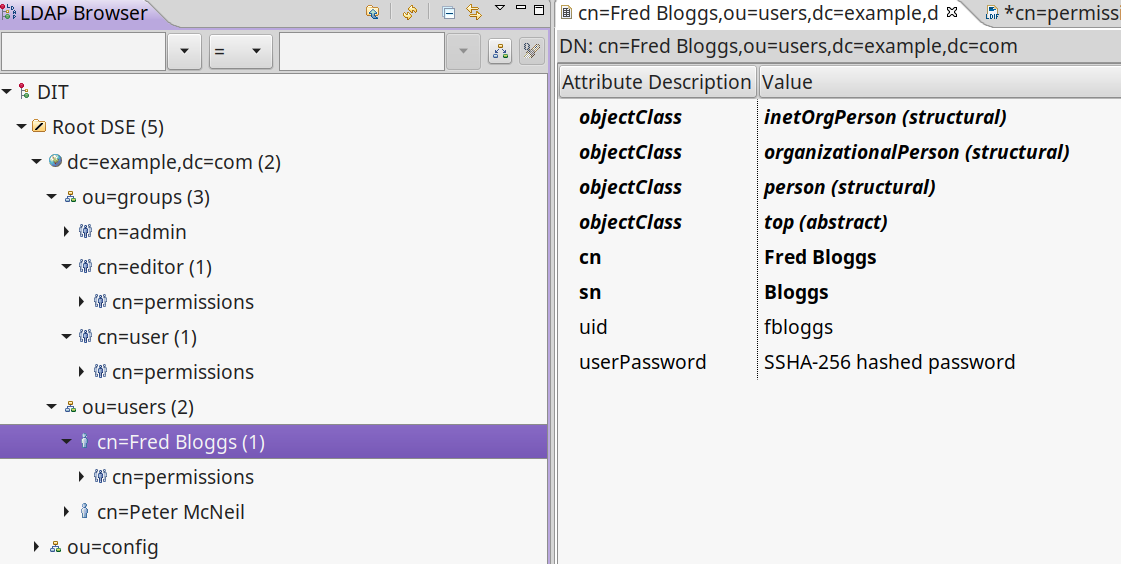
We provide a default fairly basic LDAP realm that can authenticate and get roles and permissions from an LDAP server. LDAP servers can be set up in many ways, we assume:
-
There is a 'base' user directory (ou) of something that can be authenticated, e.g.
inetOrgPerson -
Each user can have a sub element of permissions that are a
groupOfUniqueNames. The uid of the names should be a quoted permission string, e.g.uid="book:show,list" -
We need an administrative
password -
There is a group directory (ou) of
groupOfUniqueNameswhich have acn= role name, and members that are user ids (uid) indicate which users are in this group/role. -
Groups can have a permission sub element that are a
groupOfUniqueNames, just like users do.
8.3.1. Creating an LDAP realm
To get started with an LDAP realm type grails create-ldap-realm from your project directory. That will create a default
ShiroLdapRealm file in the default package. You can modify the package and path e.g.
| command | package | realmName |
|---|---|---|
|
|
|
|
|
|
|
|
|
|
|
|
|
|
|
8.3.2. Configuring the LDAP realm
The configuration for a default LDAP Realm looks like this:
---
security:
    shiro:
        realm:
            ldap:
                server:
                    urls: ldap://localhost:10389 # <- you can have multiple URLs comma separated
                search:
                    base: ou=users,dc=example,dc=com
                    user: uid=admin,ou=system
                    pass: secret
                    group:
                        name: ou=groups,dc=example,dc=com
                        member:
                            element: uniqueMember
                            prefix: uid=
                    permission:
                        commonName: cn=permission
                        member:
                            element: uniqueMember
                            prefix: uid=
                username:
                    attribute: uid
8.4. JWTRealm
coming soon
9. Principal
A principal in Shiro is simply an object. The Realm will determine how to look up the principal. When you implement the authenticate method in the Realm it returns an AuthenticationInfo object which holds a PrincipleCollection that is used to check permissions and roles via the Realm. When ever you ask Shiro if the user has a Role or Permission it takes the PrinicipalCollection you provided in the AuthenticationInfo and passes it on to the Realm to ask the question.
In the SimplifiedRealm class you get a single principal object which is derived from PrincipalCollection.getPrimaryPrincipal().
The GrailsShiroRealm trait calls your simplified method (if you haven’t overridden the trait method).
It’s good practice, if your principal object is not something simple like a String, to have a sensible toString() method.
It’s also a good idea to make sure it’s a prinicpal you understand when using it in a realm, because you may not be the only realm, and this may not be your principal object. For example in the default WildcardDbRealm we do something like this:
...
    boolean hasRole(Object principal, String roleName) {
        if (principal instanceof ShiroWildcardDbPrincipalHolder) {
            ShiroWildcardDbPrincipalHolder ph = (ShiroWildcardDbPrincipalHolder) principal
            return ph.roles.find { it == roleName} != null
        }
        return false
    }
which checks the principal is a ShiroWildcardDbPrincipalHolder, otherwise returns false, i.e. I don’t understand, so no.
10. Redirecting Unauthenticated and Unauthorized
The accesscontrol() method and Annotations in the Interceptor redirect to auth/login or auth/unauthorized directly
and currently doesn’t use the mappings. It uses the config options security.shiro.login… and
security.shiro.unauthorized… e.g.
security:
    shiro:
        login:
            controller: auth
            action: login
        unauthorized:
            controller: auth
            action: unauthorized
No exceptions are thrown with accessControl(). Annotations do throw exceptions which are caught via the
SiroGrailsExceptionResolver and redirected to the above settings.
| This has changed since v4.2 of the plugin, which used URL mappings for 403/401 return codes for Annotations only. |
11. Credential Matcher and Password encrypting
The plugin defines a credentialMatcher that can be injected into your realm and AuthController to match and encode passwords.
By default we use the BycryptCredentialMatcher which implements CredentialsMatcher and PasswordService from
org.apache.shiro.authc.credential.
The WildcardDbRealm and the AuthController both use this to encode and match passwords.
You can replace the credentialMatcher in your spring resources file. For example this would replace the matcher with the previous default SHA256 matcher.
| Simple unsalted SHA-256 hashed credentials should not be considered secure. Even with a salt SHA-256 is too quick to calculate today, seriously consider changing to BCrypt if you are currently using SHA-256. see https://en.wikipedia.org/wiki/Bcrypt |
// Place your Spring DSL code here
beans = {
    credentialMatcher(HashedCredentialsMatcher) {
        hashAlgorithmName = 'SHA-256'
        storedCredentialsHexEncoded = true
    }
}| HashedCredentialsMatcher doesn’t implement PasswordService, so you’d have to use Shiros HashingPasswordService. |
12. Remember Me
When a user ticks "remember me" when logging in, an encrypted version of the principal is stored in a cookie in the users browser. When the user comes back after the session has expired the remember me cookie is used to remember who they are but they are not authenticated for this new session yet. You can still get the principal and use that to say things like "Welcome back Peter".
You should think about whether you should use remember me at all, and what for. When you set a fixed cipherKey for remember me, so a load balanced or swarm app works with "remember me", it gives attackers a chance to access users data if they have access to the cookie or their browser.
| Don’t even think of using secured applications without encryption (HTTPS/SSL), you know that, right? |
13. Reloading Realms
While you’re working on the realm it should reload when changed without too much hassle, but if you add or remove a realm (or change its name) you’ll need to restart the app.
Also we’ve noticed that old Realms can hang around after you delete them due to gradle not cleaning up the class files, so a clean after removing/renaming a realm is a good idea.
14. Using declaritive exception handling for annotated controllers/services
Using declaritive exception handling for annotated controllers/services doesn’t work because Shiro’s AOP method interceptor gets in before the controller action is called and throws an exception in the filter.
We solve this by replacing the GrailsExceptionResolver with our own ShiroGrailsExceptionresolver that wraps the GrailsExceptionResolver and handles the UnauthenticatedException and AuthorizationException and redirecting to the the mappings for 401 and 403 in the controllers/../UrlMappings.groovy. This plugin provides these default mappings:
class ShiroUrlMappings {

    static mappings = {
        "401"(controller: "auth", action: "login")
        "403"(controller: "auth", action: "unauthorized")
    }
}